Creating an Automated Starting System for Practice

Ryan Woodruff

Several years ago, I was coaching between 12 and 20 swimmers at practice by myself, and I was looking for a way to time a series of 25s off the blocks. I wanted a system that could provide an audible “take your marks” command followed by a starting beep and repeat exactly 10.00 seconds apart. This would allow me to stand at the opposite end of the pool and accurately time the swimmers coming to the wall without having to verbally start each successive group. Below are the instructions for you to replicate the system I created.

I used a free iPhone app, a Bluetooth speaker, and my iPhone to create a system to make me a more efficient and accurate coach when we do quality sets.

First — the app. It is called IntervalTimer and is available for free in the iPhone App Store. I don’t know if it also exists for Android.
Next, I got a Bluetooth Speaker. There a lot of options available. I used the Ion Pathfinder Rugged Bluetooth Portable Speaker and set it where it won’t get wet. If you get a waterproof one, it works to set it between the starting blocks. My speaker was able to connect to my phone from over 50m away, which was helpful for long course season.

In the app, I created a timer using the HIIT template. I created 2 intervals – one called “Go” and one called “Take Your Mark.” I also chose to do 3 sets (you can choose whatever number you like), toggled “Repeat” to ON, and set it for “x100”. This creates a loop that would do starts for 50 minutes non-stop, more than long enough for most of our quality sets. Make sure you have all the settings as I have it pictured.

When setting up “Go”, and “Take Your Mark,” I set the sound settings as pictured below.
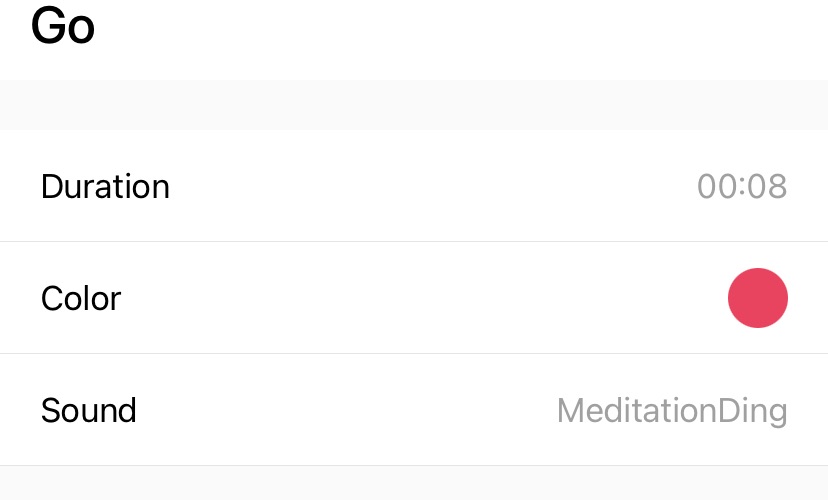

These settings show a countdown from :08 to :00, at which time the app says “Take your marks” and two seconds later sounds a loud “ding” sound.

A few final tips for usage:

  • Make sure you are connected to speaker via Bluetooth and that your phone maintains a clean line-of-sight to the speaker.
  • When you start the timer, it takes about a second for the app to begin. This is only important if you are syncing it up to your pace clock – just hit start when your pace clock says XX:X9.
  • Be sure to set your phone on “Do Not Disturb” to avoid any awkward phone calls that disrupt your timer.
  • I DO NOT RECOMMEND USING THIS SYSTEM WITH 12 & UNDERS. Make sure that all swimmers understand that if they dive in and their goggles come off, they should not stop — there is another swimmer coming 10 seconds later. MAKE SURE ALL SWIMMERS UNDERSTAND THE SET AND HOW TO SAFELY USE THIS SYSTEM.

If you use this system and have any questions or feedback, please let me know at swimmingwizard@gmail.com.

Article for Parents: The Phenom and the Climber

by Ryan Woodruff

Ours is a competitive sport and one that easily lends itself to comparison.  Whereas in basketball or soccer for example we could have endless debates about who is a better player, in swimming we have the most black and white tool for comparison that exists: THE CLOCK.  This is awesome because it allows to us to know exactly where we stand versus the competition at any meet or season of a swimmer’s career.  This knowledge can be motivating but it ignores one critical truth: that swimmers mature, grow, and improve at vastly different rates.  Every swimmer follows his or her own path.

Here is an example: Caeleb Dressel and Ryan Held both made the US Olympic team in 2016 — Dressel in the individual 100 free and both men as part of the 400 freestyle relay.  But they took different paths to get there. Dressel was an age group phenom at St. John’s Country Day School, later the Bolles School, and eventually the University of Florida.  Held grew up swimming for the Springfield (Illinois) YMCA team and swam collegiately at NC State, steadily climbing the ranks.

Here are their career progressions, by the numbers:

100 Free (LCM) Dressel Held
Age 11 59.76
Age 15 50.85 58.67
Age 20 47.17 48.26


At age 11, Caeleb Dressel was already a National Age Group record holder.  Held wouldn’t even record an official time in the long course 100 free until age 15.  Held at 15 was only 1.10 seconds faster than 11 year-old Dressel.

A closer look at their short course times is even more revealing.

100 Free (SCY) Dressel Held
Age 9 1:03.12
Age 11 54.08 1:06.78
Age 13 49.85 51.97
Age 15 44.27 45.83
Age 17 42.85 43.31
Age 21 39.90 41.05


At age 9, Caeleb Dressel was already putting up very good times in Florida, and by age 11 he was a certified phenom.  At age 11, Held had posted a time that would be 9 seconds slower than the current age group champs qualifying time in Illinois.

Both of these athletes have impressive progressions of steady improvement over time.  I remember watching Caeleb Dressel at age 10 in Florida – it was clear he was headed for big things.  If 11 year-old Ryan Held was at a meet I attended, I would have never even noticed him.  Held just kept climbing.

My point is that no two swimmers follow the same path.  Every swimmer is judged by the clock, but some swimmers will show promise early, and others won’t.  It is folly to suggest that elite senior performance can be accurately predicted.

For parents, it important to support the swimmer in his or her quest to continually improve without making comparisons.  What other swimmers are or are not achieving is simply not relevant.  Johnny being faster than Jimmy at age 10 is meaningless as evidence of who will be faster at 16. Parents can help by promoting commitment, hard work, and being a good teammate – the results will come, however fast they may be.